Status Badges
Status badges such as Just Added, Trending and Leaving soon, their priority, and the removal tools that feed Leaving soon.
Status Tags
Status Tags show one translucent badge per card: what is new, trending, airing next, or reaching a season milestone. They use the existing poster artwork and the selected tag layout.
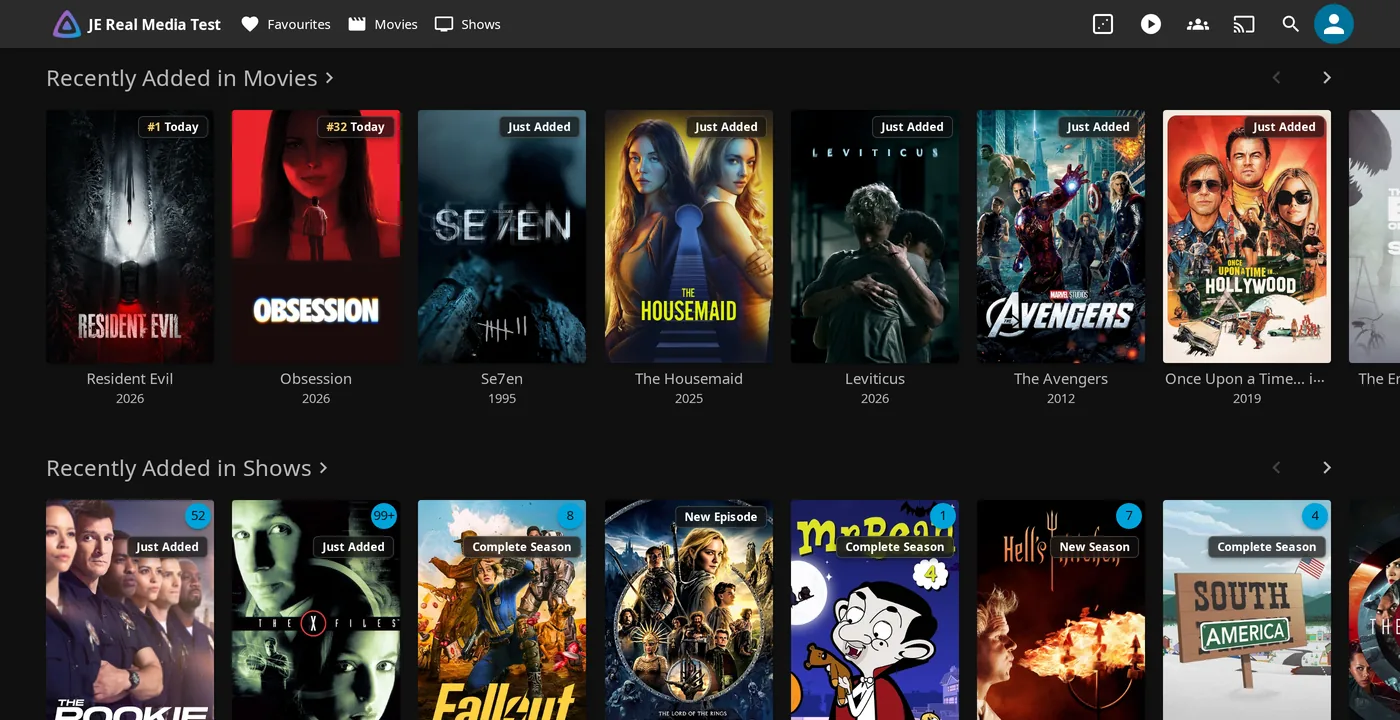
How to use: Turn on the Status group on the Groups tab of Media Tags and choose its position. Pick the badge families on the Status badges tab (the Status row's Badges button opens it). Administrators set starting defaults on the Status badges tab of the Media Tags admin tab; each user can override the eight group switches.
| Setting | Default | What it does |
|---|---|---|
| Admin: Enable Status Tags / personal: Status switch | Off | Shows one badge per supported card. The admin switch also allows server trending and series schedule lookups |
| Trending rank | On | Shows the title's trending rank. Admin Show Trending rank off stops the shared list for everyone |
| New Movie / New Series / New Episode | On | Shows release and episode-arrival badges |
| Just Added | On | Shows recently added library items |
| Airing Today / Airs / Returns / Coming Soon | On | Shows schedule badges; Coming Soon works without TMDB |
| New Season / Premiere / Finale / Complete Season | On | Shows season and series milestones |
| Returning / Ended / Cancelled | Off | Shows a series' status when no higher-priority badge applies |
| Leaving soon | Off | Shows Leaving in 5d (or Leaving soon) on items the server will remove; needs an administrator's Leaving soon source |
| Direct-play warning | Off | Shows Transcode or Won't direct play on movies and episodes this browser cannot play as they are (web only) |
| Admin: New release window (days) | 30 | Premiere dates, new seasons, season premieres and recent TMDB finales; range 1–365 |
| Admin: Just added window (days) | 7 | Item/episode added dates, an episode's own air date and season binge drops; range 1–365 |
| Admin: Show status badges on collections | On | Whether a collection can carry a status badge at all. A collection shows Just Added when one of its members was added recently; turn this off to keep badges off collections |
Badges and priority
First match wins, with one badge per card. When switched on, Leaving soon comes before every other badge on movies, series, seasons and episodes, and the direct-play warning after every other badge on movies, episodes and videos:
| Card | Badge order |
|---|---|
| Movie | Trending → Coming Soon → New Movie → Just Added → Post-credits / Mid-credits |
| Series | Trending → Airing Today → Series Finale / Binge Ready → New Season → Airs {date} → Returns {date} → New Episode → Coming Soon → New Series → Just Added → Returning / Ended / Cancelled |
| Season | Complete Season → Season Premiere → Season Finale → New Episode → Just Added |
| Episode | Season Premiere → Series Finale / Season Finale → New Episode → Just Added |
| Collection, video | Just Added |
| Badge | Cards | Data and conditions |
|---|---|---|
| #N Today / #N This Week | Movie, series | TMDB daily trending rank, or Seerr weekly trending fallback; requires the item's TMDB ID |
| Coming Soon | Movie, series | Jellyfin PremiereDate is in the future, including virtual items returned through fallback |
| New Movie / New Series | Movie / series | Jellyfin premiere date falls within the new-release window and has passed |
| New Episode | Series, season, episode | A container's latest non-virtual episode was added within the just-added window and the container predates that window, unless you have watched all of it (its played check shows on the poster). An episode itself aired or was added within that window |
| Just Added | All supported types | Jellyfin DateCreated, the date used by Date Added sorting, falls within the just-added window. A collection uses the newest DateCreated among its members instead of its own date, and shows no badge when you cannot see that member: Jellyfin can create automatic collections again during a library scan, which would mark every one of them as just added |
| New Season | Series | The newest regular season's episode 1 aired within the new-release window; season number must exceed 1 |
| Season Premiere | Season, episode | The season's episode 1 aired within the new-release window; an episode card must itself be episode 1 of a regular season and have aired within the just-added window |
| Season Finale | Season, episode | The latest aired TMDB episode matches the library episode and is within the new-release window. TMDB episode_type=finale confirms it; if absent, the local episode must be last in its season and TMDB must have no next episode, or one in a later season |
| Series Finale | Series, episode | TMDB status is Ended or Canceled, and the last aired regular episode matches the visible library episode (a combined file such as S01E09-E10 matches when it holds that episode) and falls within the new-release window. Both cache and batch paths resolve the same regular episode: TMDB's latest regular episode first (so a library holding only S1E3 of an ended ten-episode season shows no finale), then TMDB season enrichment. The library's latest episode (caller-filtered series aggregate or a fetched local aggregate) only stands in when TMDB's per-season episode counts show it is the last episode of the last season, and keeps its air date's calendar day; season 0 never supplies a series finale |
| Binge Ready | Series | The same conditions as Series Finale, for a show whose premiere and final episode aired within 3 days of each other (a one-drop release). It replaces Series Finale on such shows and, like it, lasts for the new-release window. |
| Complete Season | Season | The whole season is in the library and arrived within the just-added window: TMDB lists the season's episode count, every episode of it has aired (none scheduled in it, and the latest aired episode is its last or a later season's), and the library covers every episode number from 1 to that count (a multi-episode file covers its range and counts as its last episode for finales; a duplicate or an extra number never fills a gap), all added within the window. Without TMDB facts, with an episode still to air or any episode missing, no completion is claimed and the season shows its next badge instead. A season with more than 100 episodes is not checked episode by episode, so it never claims completion |
| Airing Today | Series | TMDB's next episode air date is today in the user's local calendar |
| Airs {date} | Series | TMDB's next episode airs in the next seven days |
| Returns {date} | Series | TMDB's next episode airs within 30 days, more than 14 days after the last aired episode. Airs takes priority inside seven days |
| Returning / Ended / Cancelled | Series | Jellyfin Continuing/Ended first. TMDB may refine Ended to Cancelled, or supply a missing Jellyfin status |
| Leaving in {days}d / Leaving tomorrow / Leaving today / Leaving soon | Movie, series, season, episode | The item (or its season or series) is in a Maintainerr collection or a leaving collection. Days are local calendar days to Maintainerr's delete date (addDate + deleteAfterDays); Leaving soon without a date or once it has passed |
| Transcode / Won't direct play | Movie, episode, video | Jellyfin's PlaybackInfo answer for this browser's device profile: Won't direct play when only the container is unsupported (a remux), Transcode otherwise. The tooltip names the reasons |
Premiere and air dates are calendar days: a title released on 5 November is Coming Soon until midnight on 4 November where you are, then New Movie (or New Episode, Season Premiere) from local midnight, in every time zone; native posters use the time zone saved with your web settings. Series and seasons follow the same rule: the server records a new season's premiere as soon as its date has begun in the earliest time zone (UTC+14) and refreshes the series then, so New Season appears at your own midnight even east of UTC, and not before it west of UTC. Added dates (Just Added) are exact times. Dates read Tomorrow, then a localized weekday for two to five days ahead, then a localized short date such as Nov 6. The user's Jellyfin display language is preferred, followed by the JE language and browser locale.
With Compact density, Season Premiere becomes Premiere; Season Finale and Series Finale become Finale; Complete Season becomes Complete; Airing Today becomes Today; Coming Soon becomes Soon; Just Added becomes Added; New Episode becomes New Ep; Leaving in 5d becomes 5d left; Won't direct play becomes Remux. Other labels retain their full text.
Scenes
 Administrator native-poster preview using cached Jellyfin streams and TMDB keywords; not a physical-client capture.
On Media Tags → Status badges, Scenes enables Post-credits and Mid-credits for movies. It starts off for both administrators and users. An administrator must enable the family on the Media Tags admin tab’s Status badges tab and configure the existing TMDB key. Then users can enable Scenes for their account. The movie in both the personal and admin live previews carries a Post-credits sample, shown when Scenes is enabled and no higher-priority family is selected.
TMDB’s exact aftercreditsstinger and duringcreditsstinger keywords supply the facts. The server resolves them daily through its shared response cache and keeps the result in the tag cache; no browser or native poster request contacts TMDB per card. A failed lookup omits an unknown marker and keeps previously confirmed facts for later retry. No keyword is not a guarantee that a movie has no extra scene. Scenes follows the usual one-badge priority, after Just Added; Post-credits wins when both keywords exist. Native posters and the batch fallback use the same facts and switches.
TMDB and trending
A TMDB API key is required for Airing Today, Airs, Returns, Season Finale, Series Finale and Complete Season. Without one, Jellyfin supplies added/release badges, New Season, Season Premiere and Returning/Ended. Cancelled requires TMDB. No Seerr schedule fallback is used.
Trending reads #N Today from TMDB's daily list when a key is configured. Without a key, or when TMDB fails or returns no rankable titles, it reads #N This Week from Seerr. With neither source, no rank appears. Only movies and series with TMDB IDs receive ranks.
The server shares up to 60 movie/series ranks for 30 minutes, with a five-minute retry after an empty answer. The list contains only public TMDB IDs and ranks. Changed ranks re-badge cards already on the page.
For series cards on screen, and parent series of season/episode cards, the browser batches up to 50 accessible IDs through GET /JellyfinEnhanced/status-tags/series. It retains schedules for an hour and retries failures after five minutes. The server shares TMDB responses for six hours, with at most four lookups in flight and 35 upstream requests per ten-second window. If the series response omits episode_type, its latest aired season supplies it. For an ended series whose latest episode is a special, the newest aired regular season also supplies a separate last regular episode. Parent aggregates fetched through /tag-data are shared by series and episode cards, expire after ten minutes, and are discarded on user or filter changes. No schedule is stored per user or in the tag cache. One shared viewport observer gates schedule requests; offscreen, detached and recycled cards do not dispatch lookups. Targets are released on removal, identity reuse, renderer cleanup and user change. A single timer re-evaluates labels at the next local midnight, and visibility/focus events refresh active cards after a suspended tab returns. User changes, renderer cleanup and pagehide cancel midnight, batch and retry timers; initialisation and pageshow resume them.
Leaving soon (Maintainerr or Reclaimerr)
Two removal tools can feed Leaving soon, the item menu and the home row: Maintainerr (below) and Reclaimerr (the next section). Exactly one is on at a time: each has a Use switch in its card in the *arr tab, and turning one on turns the other off (both can be off). The settings of the one that is off are kept. The shared options (item-menu switch, home row switch, refresh interval and the live state with Refresh now) are in their own Leaving soon card. Everything below that says Maintainerr applies while Maintainerr is the one that is on.
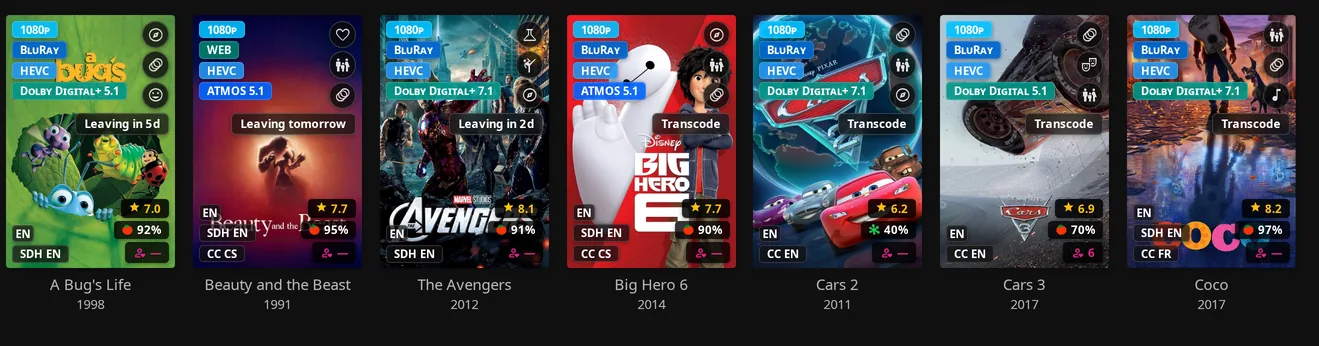
Maintainerr puts the media its rules will delete into collections (often one called Leaving Soon) and deletes each item a set number of days after it was added. With Leaving soon on, cards say when an item goes.
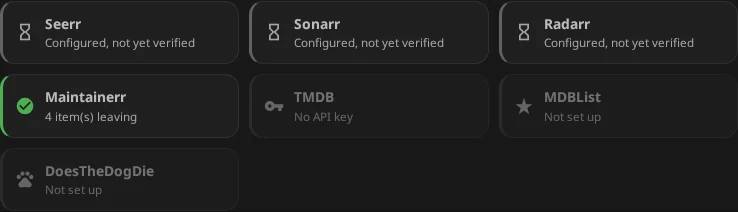
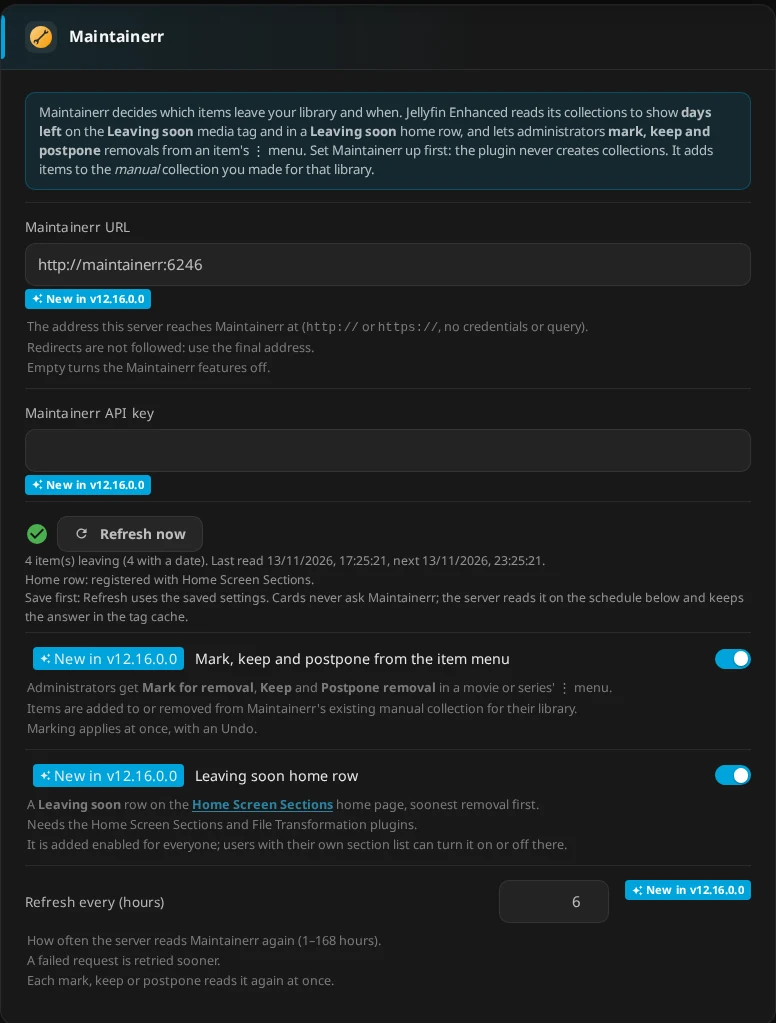
An administrator sets the source in *arr › Maintainerr (shown as a linked copy under Services; the Media Tags › Status badges › Leaving soon section shows its live state, with a Refresh now button and a link to the settings, and the Overview tab's Service Status lists Maintainerr with its last read):
| Setting | Default | What it does |
|---|---|---|
| Maintainerr URL | Empty | The address this server reaches Maintainerr at (http:// or https://, no credentials or query). The server reads GET /api/collections and computes each item's delete date from addDate + deleteAfterDays. Inactive collections are skipped. Redirects are not followed: use the final address (a redirect shows as the last failure and is logged with its host) |
| Maintainerr API key | Empty | Sent as X-Api-Key when set. It is kept in the plugin configuration like the other keys and never sent to users or written to the Leaving soon snapshot or logs |
| Leaving collections | Empty | Existing Jellyfin collection names, one per line (up to 20), whose members count as leaving, without a date. For setups without the API; nothing is created |
| Refresh every | 6 hours | How often the server reads the source again (1–168 hours) |
| Mark, keep and postpone from the item menu | On | Administrators get Mark for removal, Keep (cancel removal) and Postpone removal in an item's ⋮ menu (see below). Needs the Maintainerr URL |
| Leaving soon home row | On | A Leaving soon row on a Home Screen Sections home page (see below). Needs the Maintainerr URL |
| Leaving soon (family switch) | Off | Whether new users start with the badge on |
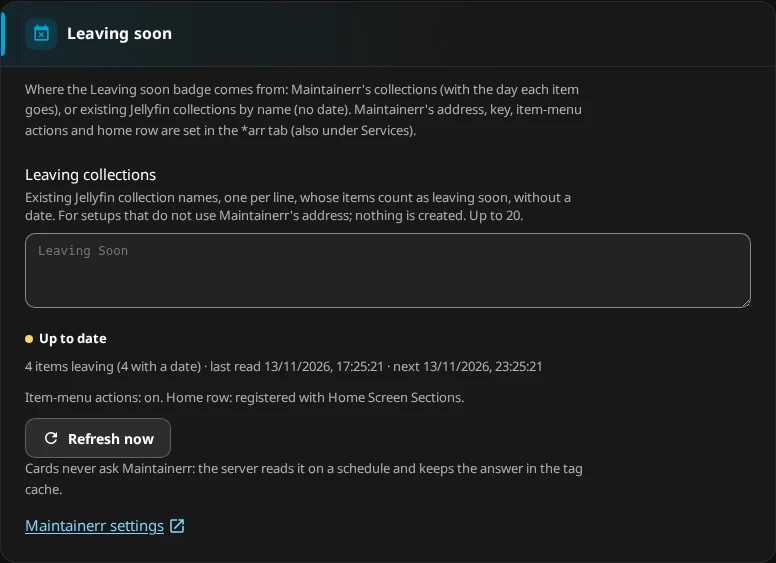
Cards never ask Maintainerr: the Refresh Leaving Soon Tags scheduled task (hourly, acting only once the interval has passed), a source change and Refresh now (in the Services card and in the Leaving soon section) read it on the server and put the result into the tag cache entries (Leaving). A failed request (including an answer that lists entries but no collection or member it can read) keeps the last good answer and retries after 15 minutes, then 30, 60 and so on, at most the refresh interval; the card shows the last read, the next one, the item counts and the last failure. Maintainerr items are matched by their Jellyfin item id (mediaServerId); a Plex-backed Maintainerr's movies and shows are matched by TMDB id. A season or episode leaves with its season or series, whichever goes first. Users who can see an item see its Maintainerr badge; a badge that only a leaving collection gives is shown to users who can access that collection (as for collection-matched Custom Tags). The collection names and the Maintainerr address stay on the server.
LeavingSoonMaintainerrApiKey is explicitly excluded from both user and administrator portable exports/imports, public/private configuration and runtime snapshots. The Services card keeps the key in a password field saved with the configuration page's Save button, like the other service keys. The administrator-only core Jellyfin plugin configuration API retains its normal credential-editing contract. Source URLs, collection names and cadence are administrator settings; private collection provenance never reaches tag clients.
Marking, keeping and postponing from the item menu
With Mark, keep and postpone from the item menu on (and a Maintainerr URL), an administrator's ⋮ menu on a movie or series (the detail page's or a card's) gets:
| Item | Row | What happens |
|---|---|---|
| Not in Maintainerr | Mark for removal | The item is added to Maintainerr's manual collection for its library, at once, and a toast with Undo follows (Undo removes it again). There is no confirm dialog |
| In Maintainerr | Keep (cancel removal) | The item is removed from its Maintainerr collection; the toast's Undo marks it again |
| In Maintainerr | Postpone removal | A small chooser: +7, +14, +30 or +90 days, a custom count (1–3650), or Reset timer (count the collection's days from today) |
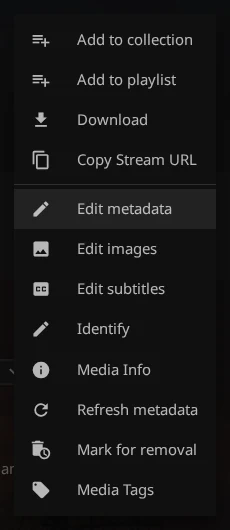

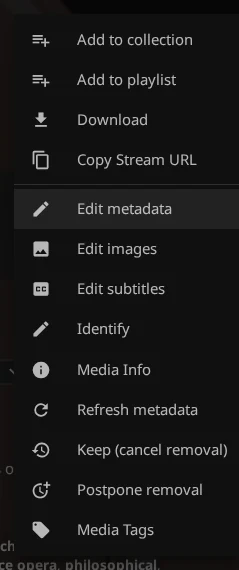
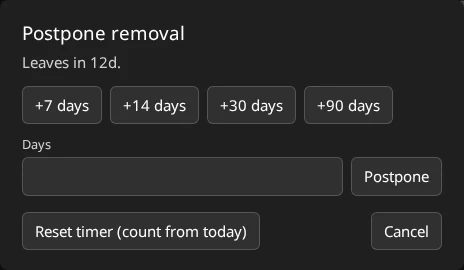
Maintainerr is set up first, as today, with a rule per library that uses a manual collection (its "Use manual collection" option); the plugin never creates collections. An item is matched to the one active manual collection of its type (movie or show) on its Jellyfin library. When one library has several (say a 4K and an HD list, each tied to its own Radarr), the plugin asks each collection's Radarr or Sonarr server, as Maintainerr lists them, whether it holds the item (by TMDB id for movies, TVDB id for series) and uses the one that does. When nothing fits, or more than one does, the toast says so and names Maintainerr's collections. Every change reads Maintainerr again at once, so the badge, the row and the next menu follow without waiting for the scheduled refresh. The rows are only offered to administrators, and the server refuses everyone else regardless; the Maintainerr address and key, and the *arr addresses and keys Maintainerr holds, never reach the browser. Seasons and episodes get no rows.
The rows are added to Jellyfin's item menu the same way as Media Tags, so they share its dependence on jellyfin-web's private menu behaviour (see One item's look).
The Leaving soon home row
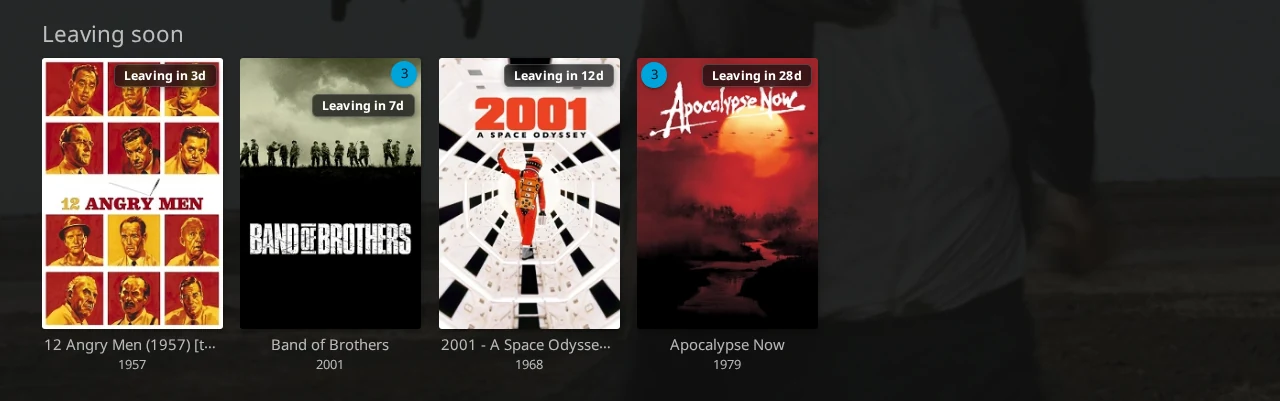
With Leaving soon home row on (and a Maintainerr URL), the plugin registers a Leaving soon section with the Home Screen Sections plugin when that plugin is installed (it also needs File Transformation to draw its rows). The row lists Maintainerr's items the viewer can see, soonest removal first, movies and series only (a leaving season or episode shows as its series), up to 20. It is registered on every start (Home Screen Sections keeps registrations in memory) and, if Home Screen Sections has no entry for it yet, added to its section list enabled for everyone with user override allowed; users who keep their own section list may need to turn it on there. The Leaving soon section of the Media Tags tab says whether the row is registered, or which plugin is missing. The cards carry the usual Leaving soon badge for users who have it on.
Leaving soon (Reclaimerr)
Reclaimerr scans your libraries with rules and routes the final deletion through Jellyfin, Radarr and Sonarr. With Use Reclaimerr on, the plugin reads it instead of Maintainerr.
Reclaimerr 0.6.15 or newer
The integration needs Reclaimerr 0.6.15 or newer, the first release whose token API covers everything the plugin does (the leaving-soon feed, deletion requests, scheduled deletions, users and the Jellyfin ids of each title). A development build counts as the release it leads up to (0.6.15-dev.1, v0.6.15-dev1 and 0.6.16-dev all qualify). With an older Reclaimerr the Leaving soon card's status says so, and nothing else is read or changed. Reclaimerr must have this Jellyfin server added as a media server: titles and people are matched by the Jellyfin ids Reclaimerr keeps for them.
| Setting | Default | What it does |
|---|---|---|
| Use Reclaimerr | Off | Turns Reclaimerr on and Maintainerr off |
| Reclaimerr URL | Empty | Where this server reaches Reclaimerr: http:// or https://, with no credentials, query or redirect |
| Reclaimerr API token | Empty | A token from Reclaimerr's Settings › Integrations with the candidates, scheduled deletions, delete requests and users (manage) and media (read) scopes. Everything the plugin reads and does in Reclaimerr goes through it, except filing a user's own request (below). Sent as a bearer token; masked in the page like the other keys, and never sent to users or written to the snapshot or logs |
| Let users request removals | Off | Adds Request removal to the ⋮ menu for users who are not administrators (it needs Mark, keep and postpone from the item menu on in the Leaving soon card, since that is the menu it is in). Reclaimerr's token cannot file a request for someone else, so the plugin files it as the user's own Reclaimerr account, the one linked to their Jellyfin account, through Reclaimerr's trusted-proxy sign-in (see below). A user gets a linked account from Import Jellyfin users, or by signing in to Reclaimerr with Jellyfin once. A user without one is told to ask an administrator |
| User header | Remote-User |
The header the Reclaimerr user name is sent in; match Reclaimerr's FORWARD_AUTH_USER_HEADER |
Coming from an earlier build of this integration
The service account, its password and the Jellyfin user to Reclaimerr user list are gone, and so is Act as the Jellyfin user: turn on Let users request removals if users should request removals. Give the API token the new scopes above (Reclaimerr's own Settings › Integrations), and link people with Import Jellyfin users (or by their signing in to Reclaimerr with Jellyfin once). Requests filed earlier under the service account stay in Reclaimerr, but no longer show under the person's My requests.
Import Jellyfin users (in the same card) runs Reclaimerr's own import for this server: every Jellyfin user without a Reclaimerr account gets one, with the permissions and pages ticked, linked to their Jellyfin account. Users already linked are left as they are. A user Reclaimerr would match to an existing account by name or email is not linked from here; the result lists them, and you confirm those links under Reclaimerr's Settings › Users › Import from media server.
User audit (in the same card, Run Audit) checks each Jellyfin user against Reclaimerr without changing anything: whether one active Reclaimerr account is linked to them, and, with Let users request removals on, whether Reclaimerr's trusted-proxy sign-in accepts that account and whether it has the Request permission (administrators mark instead, so nothing about them is flagged). It also lists the token scopes above that the token lacks, with what goes without each, and says once when the trusted-proxy sign-in is refused or Reclaimerr stops answering (users it did not reach show as not checked). On the Leaving soon page, an administrator whose requests could not be read is told Reclaimerr's reason, such as a scope the token lacks.
What it reads and does:
- Leaving soon facts. Reclaimerr's leaving-soon list: cleanup candidates whose automatic deletion is scheduled, eligible or postponed, manual deletions scheduled from Jellyfin or Reclaimerr, and approved requests waiting for their day. The date is the one Reclaimerr gives. Each entry marks the Jellyfin items Reclaimerr names for it (a whole movie or series, or one movie version and the movie card that shows it); a season or episode on its own does not mark its series, and a blocked or failed schedule is left out until it is rescheduled. The Leaving soon page shows the space each title frees as Reclaimerr counts it.
- Item menu (administrators). Mark for removal opens a chooser with +7, +14, +30, +90 days and an exact-day picker (30 days is only the default) and schedules a manual deletion of the whole title, or of the version picked on the item page when the movie has several. Keep protects the candidate (or cancels the scheduled deletion). Postpone removal takes a day count, an exact day, or Reset timer for a candidate.
- Requests (administrators). The Leaving soon page lists waiting requests with the person who asked (their Jellyfin name and avatar). Approve asks when to delete: after Reclaimerr's grace period (Settings › General, none by default), now, or on a day; Deny keeps the title. Reclaimerr records the token as the reviewer, so the note says which administrator approved or denied it in Jellyfin.
- Request removal (users). With Let users request removals on, a user who can see a movie or series gets Request removal in the ⋮ menu. It files a Reclaimerr deletion request as their own account, with their note as the reason. Asking again while a request is waiting does not file a second one: the user is told it is already waiting. Their requests and how each ended appear on the Leaving soon page under My requests.
- Home row and badges. The same Leaving soon row and badge as with Maintainerr, fed by Reclaimerr's data. Reclaimerr itself also keeps
Leaving Sooncollections in Jellyfin (named under Settings › General › Leaving Soon Collections in Reclaimerr); it has no Home Screen Sections row of its own, which is what this row adds.
Requests as the user: Reclaimerr side
Set these on the Reclaimerr container and restart it:
FORWARD_AUTH_ENABLED=true
FORWARD_AUTH_USER_HEADER=Remote-User
FORWARD_AUTH_TRUSTED_PROXIES=<the address Jellyfin's requests arrive from>
FORWARD_AUTH_TRUSTED_PROXIES takes the peer address Reclaimerr sees, not the client. With Reclaimerr in Docker and Jellyfin on the same host, requests to the published port arrive from the Docker bridge gateway (for example 172.80.32.1) or, when the plugin uses the host's LAN address, from that address; list the one you use. Reclaimerr rejects * and all-address ranges, ignores the header from any other peer (the log says "Ignored Remote-User authentication header from untrusted peer"), and only maps the name onto an existing active user: it never creates accounts or roles. Local sign-in keeps working for requests that carry no header. Anything running on the trusted address can claim any Reclaimerr user, so trust only addresses you control and keep the Reclaimerr port off the public internet. Only filing a user's request, and the User audit's read-only check of it, use this; everything else uses the token.
Direct-play warning
With Direct-play warning on, movies and episodes that this browser would not play as they are get Transcode (video, audio, subtitles, bitrate or HDR need converting) or Won't direct play (only the container needs a remux). Hover the badge for the reasons, for example Transcode: video codec hevc, audio codec dts.
The answer comes from Jellyfin's own negotiation, POST /Items/{id}/PlaybackInfo with the device profile the web player itself would send: a port of jellyfin-web 12.1's browser profile (the same browser checks for containers, codecs, HDR, interlacing and levels, and your Playback settings in this browser such as DTS, TrueHD, subtitle burn-in and PGS rendering, audio channels and maximum resolution), or the app's own profile in a desktop or TV app, and your saved video quality for this network (the one you chose, or the last automatic measurement). Signing in as another user or changing one of these settings in the page builds the profile again, so lookups ask with the new one. Nothing plays or transcodes. Lookups run only for cards on screen that show no other status badge, in idle moments, at most two at a time (also across page changes and user switches: a request still on its way keeps its place until it ends, at most 15 seconds, after which it is cancelled and counts as a failed lookup) and a few per idle slice. An item with several versions is asked about the version its card shows: the one you picked on its details page (Quality Tags remember it in this browser), else the one Jellyfin plays by default. Answers are kept per item, version, device profile and quality for a day, in memory and in this browser's tag cache store, and only for the media they were given for (each version's revision from the server, covering every fact a playback profile can check: bitrate, bit depth, level, scan type, frame rate, codec tag, anamorphic, reference frames, rotation, NAL length size, colour primaries, space and range, HDR10+ and Dolby Vision facts, and the codec, language and external, default and forced flags of every stream, subtitles included; a card without that revision fingerprints the same list from the facts it holds): a replaced or re-encoded file is asked about again at once, an answer stored before this check existed is asked again, and an answer still on its way for the old file is never shown for the new one; a failed lookup is retried after ten minutes. It skips every item Jellyfin would probe to answer: a .strm item (Jellyfin refreshes it with a remote probe on each such lookup, even when it was probed before) and an item whose tag data lists streams but no video stream in its first media source (media never probed) are not looked up and show no warning. Items whose tag data lists no streams at all (stripped or not sent) are looked up. It is a per-browser check: another device can play the same file differently. Native Poster Tags never show it, because a static poster has no client profile.
Native status badges
Native Poster Tags draw the same winning status chip, with your family switches and the administrator's day windows. Native trending follows the web's sources and wording: TMDB's daily list (#N Today), else Seerr's weekly list (#N This Week), refreshed every 30 minutes (5 after an empty answer) in the background; with neither source it shows no popular badge. A poster request never waits for either. Native schedule facts share the six-hour TMDB response cache. Native posters show Leaving soon like the web (dates in the time zone saved with your web settings) but never the direct-play warning.
Cache, access filtering and styling
The current tag cache schema (CurrentCacheSchemaVersion in Services/TagCacheService.cs) includes Leaving (DeleteAt, Unix ms or null), Awards, Logos, CustomTags, named-source Ratings, LibraryId (library rules), Status, LatestEpisodeAired, LatestEpisodeIndex (Season, Episode, IsLast), SeasonPremiere (Season, Aired), SeasonAddedSpan (First, Last, Count) and EpisodeIndex (Season, Episode, nullable IsLast). Dates are Unix milliseconds UTC. Movie, series and episode entries can have PremiereDate. The persisted browser copy is replaced when its entry schema differs.
All derived episode facts follow the existing access-filtering and filterRevision path. When any contributing episode is inaccessible, related aggregates are omitted conservatively; the shared entry is unchanged. The server-only StatusEpisodeIds, LatestEpisodeId and NextEpisodePremiere never enter client responses. NextEpisodePremiere records the next relevant future air date; reconciliation and snapshot load recompute elapsed boundaries without requiring a metadata save. Compatible snapshots without the optional field seed the boundary from their cached episode dates. Episode changes refresh sibling indexes and contributor lists together. With server cache off, tag-data?latestEpisode=true computes through the target user's access.
Spoiler Guard preserves added-date badges and movie/series trending ranks. Guarded season/episode entries omit air dates and milestone indexes, suppressing premiere/finale badges. Complete Season still needs the whole season among their visible episodes.
Style .status-tag or its --trending, --new, --added, --schedule, --milestone, --status, --leaving, --playback modifiers. Each chip has data-je-status: existing styles keep added, newMovie, newSeries, newEpisode and trending; new badges use keys such as new_season, every Leaving soon badge uses leaving and both direct-play warnings direct_play (which also carries data-je-dp and a tooltip); the number inside a trending chip is .status-tag-rank.